Insights
/
feb 16, 2025
AI vs Automation: Differences, Similarities & When to Use Each
Confused between AI and automation? Discover how they differ, when to use each, and why companies use both together for maximum efficiency and results.
/
AUTHOR

Gracia Perkin
Your business needs to accelerate. You've heard the buzz about both AI and automation. But here's what most companies miss: 84% of executives believe AI is essential for growth, yet many still confuse it with traditional automation.
The confusion has real impact. Wrong choice means wasted effort and missed opportunity. Right choice means 3-5x efficiency gains.
This guide cuts through the noise. We'll explore what each technology actually does, why they're different, and which one solves YOUR specific challenge. ZeluAI has guided many companies through this exact decision, and the pattern is clear: understanding your options separates winning businesses from those stuck between tools.
What Exactly Is Automation?
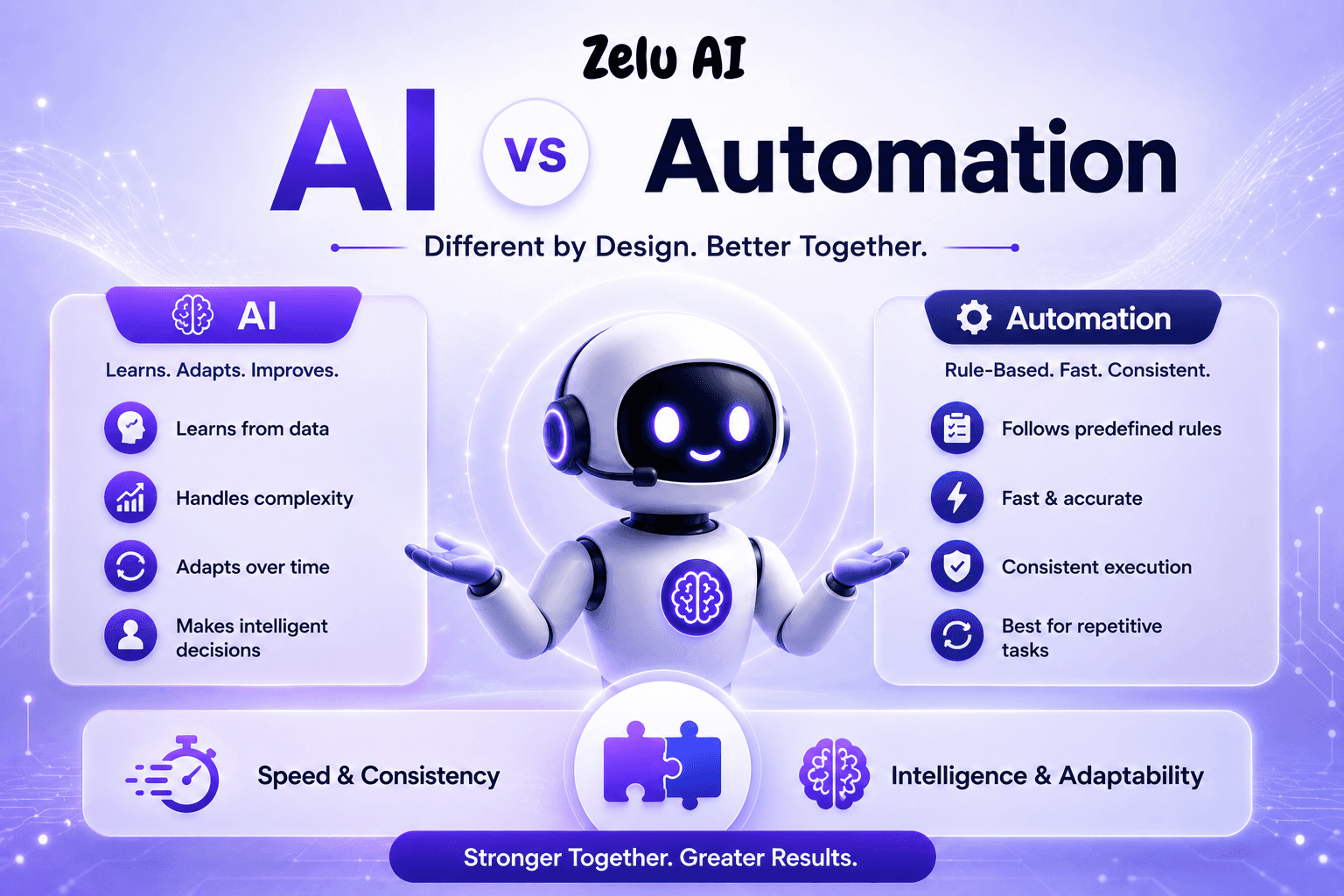
Automation means using technology to perform tasks with minimal human intervention, following predefined rules and instructions. Once you set up the rules, the system executes the same way every time—no exceptions, no learning, just consistent execution.
Think of it like a traffic light. When the timer says "change," it changes. No judgment. No adaptation. Just rules.
You define the rules upfront. "If payment is under $100, approve automatically." "If customer clicks button X, send email Y." The system follows these instructions perfectly, every single time. Speed? Instant (milliseconds). Reliability? Perfect, as long as the rules are right.
Automation excels at repetitive tasks with clear rules. Invoice processing, email routing, data entry, automated approvals—these are automation's sweet spot. You can process hundreds of invoices per month with zero human intervention.
The catch? Automation can't think. A new vendor format throws it off. A customer email phrased differently breaks it. It's rigid, consistent, and fast—but only for exactly what you programmed it to do.
What Does Artificial Intelligence Actually Do?
AI-powered customer service automation means systems that learn from data, recognize patterns, and make decisions that improve over time.Unlike automation, AI doesn't follow a preset script. It writes the script in real-time based on what it has learned.
Here's the key difference: automation follows rules you define. AI learns rules from examples.
Feed an AI system 1,000 examples of customer feedback—some happy, some angry. The AI learns what happy customers say versus frustrated ones. When new feedback arrives, the AI recognizes the pattern and understands the sentiment correctly. Month one? Maybe 80% accuracy. Month six? 90% accurate. Month twelve? 95% accurate. It improves because it learns.
AI thrives on complexity, variation, and unstructured data. Customer emails in different formats, document processing with varying layouts, feedback analysis with emotional nuance—these are where AI shines. It handles exceptions naturally. It adapts automatically. It gets better over time.
The trade-off? Setup requires more time and preparation. You need training data. You need patience for the learning phase. But once it's working, the flexibility and continuous improvement are worth the investment.
How Are AI and Automation Actually Different?
Both save time and reduce errors. Both increase efficiency. Both reduce manual work. That's why people confuse them. But the differences matter—they determine which technology solves your problem.
Decision-Making Capability
Automation follows predefined logic. "If this, then that." Zero judgment. AI makes decisions based on learned patterns. It says, "Based on past examples, this looks like X with 95% confidence." One doesn't think. The other learns.
Handling Change
When a vendor changes their invoice format, automation breaks. You need IT to reprogram it. Custom ai adapts automatically. New format? It figures it out. Automation is rigid. AI is flexible.
Data Requirements
Automation needs zero historical data just clear rules. AI needs 50-500+ examples to start learning, and 1,000+ examples to become reliable.
Implementation Effort
Automation requires quick setup with minimal preparation. AI requires more upfront work data gathering, training, validation but improves performance over time so the effort-per-outcome decreases significantly.
Improvement Over Time
Automation stays the same forever unless you reprogram it. AI improves constantly. Same accuracy month-one as month-twelve with automation. With AI, you expect continuous improvement.
The bottom line: Automation is speed and consistency. AI is intelligence and adaptation. Companies winning now understand both and use them together.
When Should You Actually Use Automation?
Automation works best when your task is repetitive, the rules are clear, and consistency matters more than flexibility.
Use automation for high-volume, rule-based tasks. You process 200 invoices per month with the same vendor format? Automation is perfect. Quick implementation: 2-4 weeks, delivering 40-60% labor efficiency gains.
Use automation for predictable workflows. Support emails arrive and need routing to the right department? 10 categories, clear rules. Automation handles it in 1-2 weeks with immediate productivity gains.
Use automation for consistency. Data entry, scheduled reports, recurring payments—when the process never changes, automation is your answer.
Don't use automation when the task varies, when you need to handle exceptions, or when learning would help. That's when you need AI.
When Should You Actually Use AI?
AI works best when your task is complex, the rules vary, or you need the system to improve over time.
Use AI for complex decision-making. Loan approvals involve 20+ variables. Code all the rules? Thousands of lines with hundreds of edge cases. Train AI on 1,000 past approvals? Two to four weeks, then it handles the nuance with 60-70% efficiency gains in processing speed and accuracy.
Use AI for unstructured data. Customer emails come in any format. Documents vary in layout. Images, text, mixed content. Automation can't handle it. AI learns what you're looking for and finds it. Accuracy improves from month one to month six as it learns.
Use AI for flexibility and adaptation. Customer support chatbots need to answer 1,000s of different questions. You can't code every response. Train AI on past conversations? It learns intent and answers new questions intelligently.
The Real Mistake Most Companies Make
Most businesses start with the wrong technology and waste months fixing it. They use automation for tasks that need AI invoice processing where vendors keep changing formats, customer feedback analysis where emotion varies, decision-making where rules keep changing. Result? Constant updates, low accuracy, frustration.
Or they use AI for tasks that need automation simple data entry, scheduled reports, routine approvals. Result? Implementing unnecessarily complex solutions for straightforward problems, overcomplicating what should be simple.
The answer: Start simple (automation), add intelligence (AI) only when needed. Automation is efficient and quick to implement. Use it first. If rules break down or variation causes problems, then add AI.
The Winning Approach: Use Both Together
Automation handles the workflow. AI handles the intelligence. Together they're unstoppable.
Here's a real example: A finance team processes 1,000 invoices monthly. Automation routes documents, validates formats, stores correctly.
AI extracts vendor, amount, date intelligently, learns new formats, improves accuracy. Together: 85% automatic processing, 99% accuracy, significant efficiency gains across the team.
Automation alone? Only 30% processed automatically, more errors. AI alone? Slower, more resource-intensive. Together? Fast, accurate, scalable.
Final Thoughts
Look at your top three time-consuming processes. Ask the five questions above. Pick one for a two-week pilot. Measure results. Scale what works.
Most businesses achieve 40-70% efficiency gains in processing and significant team capacity improvements once they get this right. The question isn't which technology is better. The question is which technology solves YOUR problem.
Want a personalized assessment? ZeluAI analyzes your top processes, maps them to automation or AI, and identifies the right approach for your business. No obligation. Just honest guidance on what actually works for your situation. Book Your free assessment ith us!
Key Takeaways
Automation and AI are not the same but they work best together. Automation excels at speed and consistency. AI excels at intelligence and adaptation. Understanding which one solves which problem determines your success. Start simple with automation, add AI where it matters, and watch your business accelerate.
FAQs
How long does it take to implement automation?
Most automation implementations take 2-4 weeks depending on process complexity and your team's technical resources.
Do we need to hire specialists to set up AI or automation?
Automation usually requires minimal technical help, but AI often benefits from data science expertise or managed platform support.
Can we switch from automation to AI later if needed?
Yes, automation and AI work well together; you can start with automation and add AI as your processes evolve and complexity increases.
What's the typical accuracy rate for AI systems in real-world use?
AI systems typically achieve 80-95% accuracy, improving over time with more training data and feedback.
How much technical knowledge does my team need to use automation tools?
Most modern automation tools (Zapier, Make) require no coding—business users can build workflows with visual interfaces.