/
Customer Service Chatbot: What It Does and How to Get One
A customer service chatbot answers questions, captures leads and hands off to your team. See what it handles, how to roll it out and how to measure it.

Customer Service Chatbot: What It Does and How to Get One
A customer service chatbot is software that answers customer questions, routes requests and captures contact details on your website or messaging channels without a staff member in every conversation. For a service business, the version worth buying is not a generic widget. It is a chatbot built around your own services, connected to your CRM and calendar, with a clean handoff to your team. That is what we build at Zelu, and it is the difference between a bot that deflects visitors and one that books appointments and follows up on leads.
This guide is written for clinics, law offices, construction companies and other service businesses. It covers what a chatbot can handle, where it needs a human, how to roll one out and how to tell whether it is working.
ZeluaiMake Customer Conversations Easier to ManageZelu creates custom AI agents and CRM integrations to help service businesses reduce repetitive tasks and improve lead follow-up.Visit
TL;DR
A customer service chatbot handles routine questions, books appointments, captures leads and creates tickets when your team is away.
Rule-based bots follow a fixed script. AI chatbots understand varied phrasing, and the best ones act inside your CRM and scheduling tools.
Handoff to a human is the part that decides whether customers trust the bot. Design it before you design the conversations.
Law offices and clinics need extra care: bots must never give legal or medical advice and must be clear that they are bots.
Measure resolution, not just how many chats the bot closed. A customer who gives up is not a success.
Table of Contents
What a customer service chatbot actually does
Rule-based, AI and agent: three kinds of chatbot
What a chatbot can handle in a service business
Where each type of business gets the most from it
From support tool to lead engine
Human handoff: the part that decides whether it works
How to roll one out, step by step
How to measure whether it is working
Why a custom build suits a service business
Where customer service is heading
FAQ
Sources
What a customer service chatbot actually does
At its simplest, a chatbot is a program that talks with customers by text or voice to resolve an issue. IBM describes the customer service version as an application that simulates human conversation, handles many conversations at once and runs around the clock. For a business with a small front desk, that last point matters most. Nobody is left on hold at 7 p.m., and a visitor who asks a question on Sunday gets an answer on Sunday.
In practice the work falls into four jobs:
Answering questions. Hours, service areas, what a first visit involves, what documents to bring.
Taking action. Booking, rescheduling and canceling appointments, collecting intake details.
Capturing leads. Asking a few qualifying questions and saving the contact details to your CRM.
Passing the conversation on. Creating a ticket or alerting a person when the question is beyond the bot.
Rule-based, AI and agent: three kinds of chatbot
The word “chatbot” covers three very different tools, and most disappointment comes from buying the wrong one.
Rule-based chatbots follow a fixed decision tree. Shopify’s chatbot guide explains that they respond according to a predetermined if/then script and cannot handle input that strays from it. If a patient types “can I get in this week?” and your flow expects the button “Book appointment,” the bot stalls.
AI chatbots use natural language processing to work out what the person means. They treat “how much is this?” and “what do you charge?” as the same question, and they keep track of context across several messages. They answer from your own material, such as your service pages, FAQs and policies, rather than from a script.
AI agents go one step further. They do not just reply, they act: they check a calendar, update a CRM record, send a follow-up or trigger a workflow. Intercom’s guide puts the difference neatly: a chatbot tells you where to go, an agent completes the task. We cover the same distinction on our own site in how AI agents differ from traditional chatbots.

For a service business, the agent model is usually the right target. The value is not in a nicer FAQ. It is in the work your staff would otherwise do by hand after every inquiry.
What a chatbot can handle in a service business
The table maps common requests to how well a chatbot fits. “Good fit” means a well-built bot can usually complete the request alone. “Assist” means the bot gathers details and passes it to a person.
Request | Typical business | Chatbot role |
|---|---|---|
Hours, location, service area | All | Good fit |
Booking and rescheduling | Clinics, contractors | Good fit with calendar integration |
New inquiry intake | Law offices, contractors | Good fit: collect details, qualify, notify staff |
Quote or estimate requests | Construction, home services | Assist: collect scope, photos and address |
Order or project status | Contractors, agencies | Good fit if connected to your project tool |
Billing disputes | All | Assist: escalate to a person |
Upset or sensitive conversations | All | Assist: escalate immediately |
A bot cannot see live pricing, calendar availability or project status unless it is integrated with those systems. That is why connection to your tools matters more than the cleverness of the language model. A bot that guesses at availability creates more work than it saves.
Where each type of business gets the most from it
Clinics
Front desks lose hours to the same calls: appointment changes, directions, insurance questions, what to do before a visit. A chatbot or AI voice agent can take these around the clock and write the result into the scheduling system. Anything involving symptoms, diagnosis or treatment decisions should go straight to a staff member. Because patient information is sensitive, decide up front what the bot may collect and where that data is stored.
Law offices
The pressing problem for most firms is follow-up: a prospective client writes in at night and is called back two days later, by which time they have hired someone else. A chatbot can respond immediately, gather the basics and offer a consultation slot. The American Bar Association notes that chatbots can respond to basic inquiries at any hour and guide visitors to consultation scheduling, and it also warns that they may misinterpret complex legal questions and can confuse users about whether they are talking to a lawyer. The practical rules follow directly: the bot states clearly that it is an automated assistant, gives no legal advice, and collects only what is needed to start a conversation. The ABA’s Formal Opinion 512 on generative AI also points lawyers to their duties around client confidentiality and communication when they use these tools, so a firm should review how any chatbot stores and uses client information before launch.
Construction and home services
Contractors lose jobs in the gap between a homeowner’s first message and the first reply. A bot that asks the project type, location, timeline and budget range, then sends the lead to your CRM and notifies an estimator, turns a website into a standing intake desk. One example from our own work is AI lead generation software for DiBara Masonry, a service business in Los Angeles.
From support tool to lead engine
Most searches for a customer service chatbot are about support, but for a service business the same conversation is often a sales conversation. Someone asking “do you handle commercial roofing?” is a prospect. If the bot answers, asks two qualifying questions and captures a name and phone number, the support tool has become a lead channel.
A lead-oriented chatbot can typically qualify and segment leads, collect contact information, book meetings and trigger follow-up messages. The key is what happens afterward. A lead that sits in an inbox is wasted, so the bot should write to your CRM and start a follow-up sequence automatically. That is where AI-powered CRM work and chatbot work meet, and it is why we treat them as one project rather than two. Our AI lead generation offer pairs this kind of capture with traffic sources such as Meta Ads and AI-focused SEO.
Human handoff: the part that decides whether it works
The most common failure in chatbot projects is a bot that will not let go. Customers who cannot reach a person lose trust fast, and that damages the business, not just the conversation.
A good handoff has three parts:
Clear triggers. The bot escalates when the customer asks for a person, when it is unsure of its answer, when the customer sounds frustrated, or when the topic is sensitive (billing disputes, refunds, medical or legal matters).
Full context. The staff member receives the transcript, the details the bot already collected and the reason for the escalation, so the customer does not repeat themselves.
Honest messaging. The customer is told a person is taking over and roughly when to expect a reply.
Decide these rules before you write a single conversation flow. Out-of-hours behavior belongs here too: if no one is available, the bot should create a ticket or book a callback rather than leave the visitor with a dead end.
If you want to think through where automation ends and people begin, our article on AI or human support in automated customer service goes deeper.
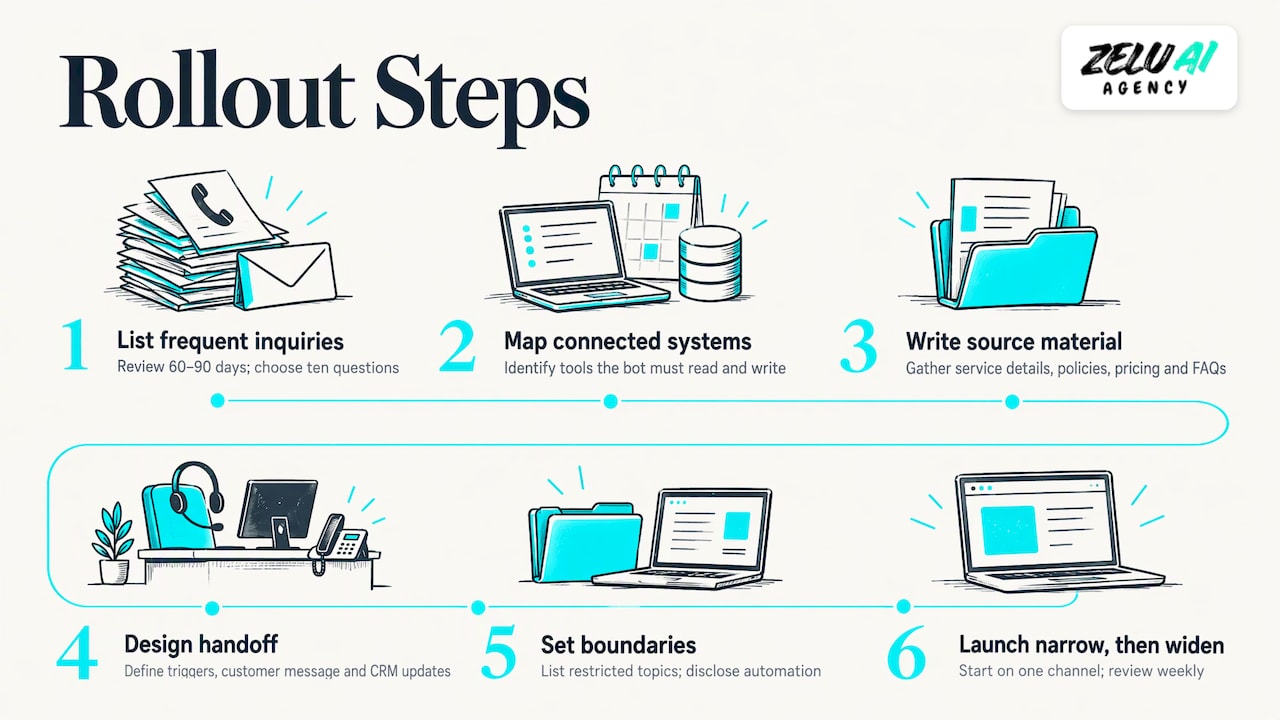
How to roll one out, step by step
1. List your most frequent inquiries. Pull 60 to 90 days of emails, call logs and web form entries. Pick the ten most common, low-complexity questions. These are your launch scope. Where it goes wrong: starting with the hardest cases because they feel the most valuable. Start with the high-volume, simple ones and expand.
2. Map the systems the bot must read and write. Which tools hold your calendar, customer records, project status and billing? A bot that cannot read them will guess. A bot that cannot write to them leaves your staff to re-enter everything. This is where off-the-shelf widgets run out of road, and where we integrate the agent with your existing platforms so it works inside your workflow instead of beside it.
3. Write your source material. The bot is only as accurate as the content it draws from. Gather service descriptions, policies, pricing logic and FAQs. Outdated content produces outdated answers, so assign someone to keep it current.
4. Design escalation and follow-up first. Define the handoff triggers, what the person receives and which CRM fields are updated after every conversation.
5. Set boundaries. List topics the bot must never answer: legal advice, medical advice, tax or financial decisions. Make the bot identify itself as automated at the start.
6. Launch narrow, then widen. Release on one channel (your website, say) with the launch scope. Review real conversations weekly, fix gaps and then add channels, such as a voice agent for phone calls, where the choice between voice and chat depends on how your customers prefer to reach you.
How to measure whether it is working
The easy number is containment: the share of chats the bot finished without a human. The trap is that a customer who gives up also counts as contained. Pair it with resolution: did the customer get what they needed and not come back about the same issue?
Set a baseline before launch and track these weekly for the first three months:
Resolution rate, confirmed by the customer not reopening the issue
Handoff rate and the reasons behind it
Customer satisfaction on bot-handled chats compared with human-handled ones
Time to first response and time to resolution
Leads captured and leads booked, for businesses using the bot to generate inquiries
Staff time saved on routine requests
Expect results to improve with tuning. Reading the transcripts where the bot failed is the fastest way to improve it, because every miss shows you a missing piece of source content, a missing integration or a missing escalation rule.
Why a custom build suits a service business
A generic chatbot treats a dental clinic, a family-law practice and a masonry contractor as the same company. They are not. Their questions, their intake data, their calendars and their risks are different. A bot that knows your intake form, writes into your CRM and escalates according to your rules will perform differently from one that was configured in an afternoon.
This is the case for a custom build. Zelu creates custom AI agents, AI chatbots, AI voice agents and AI-powered CRM systems, and our solutions are built by credentialed engineers and tailored to each client’s workflows. We have worked with over 100 companies, and you can browse the projects in our portfolio of case studies.

If you are planning a chatbot for support, intake or lead follow-up, tell us which systems you use and what your team repeats most. We will shape the agent around that. Start at zeluai.com or see how we approach custom AI automation.
Where customer service is heading
The direction is clear: from bots that point people to answers, to agents that complete the task. For a business with limited staff, that means more of the repetitive work, such as booking, follow-up, status updates and data entry, can happen without anyone touching it, while people focus on the conversations that need judgment and warmth. We explore this in why AI agents are the future of customer service. The businesses that benefit most are the ones that treat the bot as part of their operations, connected to the CRM and the calendar, rather than as a widget bolted on to the website.
FAQ
What is the difference between a customer service chatbot and a customer support chatbot?
In everyday use there is no meaningful difference. Both terms describe software that answers customer questions and routes requests. What matters is the capability behind it: a scripted bot, an AI chatbot that understands varied phrasing, or an agent that takes action in your systems.
Can a chatbot generate leads as well as answer questions?
Yes. A chatbot can engage a visitor immediately, ask qualifying questions, collect contact details, book a consultation and trigger follow-up messages. The results depend on whether the captured lead goes into your CRM and is followed up quickly, which is why integration matters.
Will a chatbot replace my front desk or intake team?
No, and it should not try to. It takes the repetitive requests and the after-hours inquiries so your team can spend time on conversations that need judgment, such as sensitive matters, complex cases and upset customers. A clear handoff keeps those with a person.
Is a chatbot safe for law offices and clinics?
It can be, with rules. The bot should say it is automated, give no legal or medical advice, collect only the information needed and escalate sensitive matters to staff. Review how conversation data is stored and who can access it before launch, and check your professional obligations with your own counsel or compliance lead.
Sources
Using Chatbots on Your Law Firm Website: Pros and Cons, American Bar Association
ABA issues first ethics guidance on a lawyer’s use of AI tools
What Is a Chatbot? Definition, Types, and How They Work, Shopify
