رؤى
/
16 فبراير 2025
How AI Voice Agents Actually Sync With Your CRM?
An AI voice agent that can't reach your CRM is only doing half its job. See how the connection actually works, what gets captured, and what still needs a human.
/
مؤلف

غرايسيا بيركين
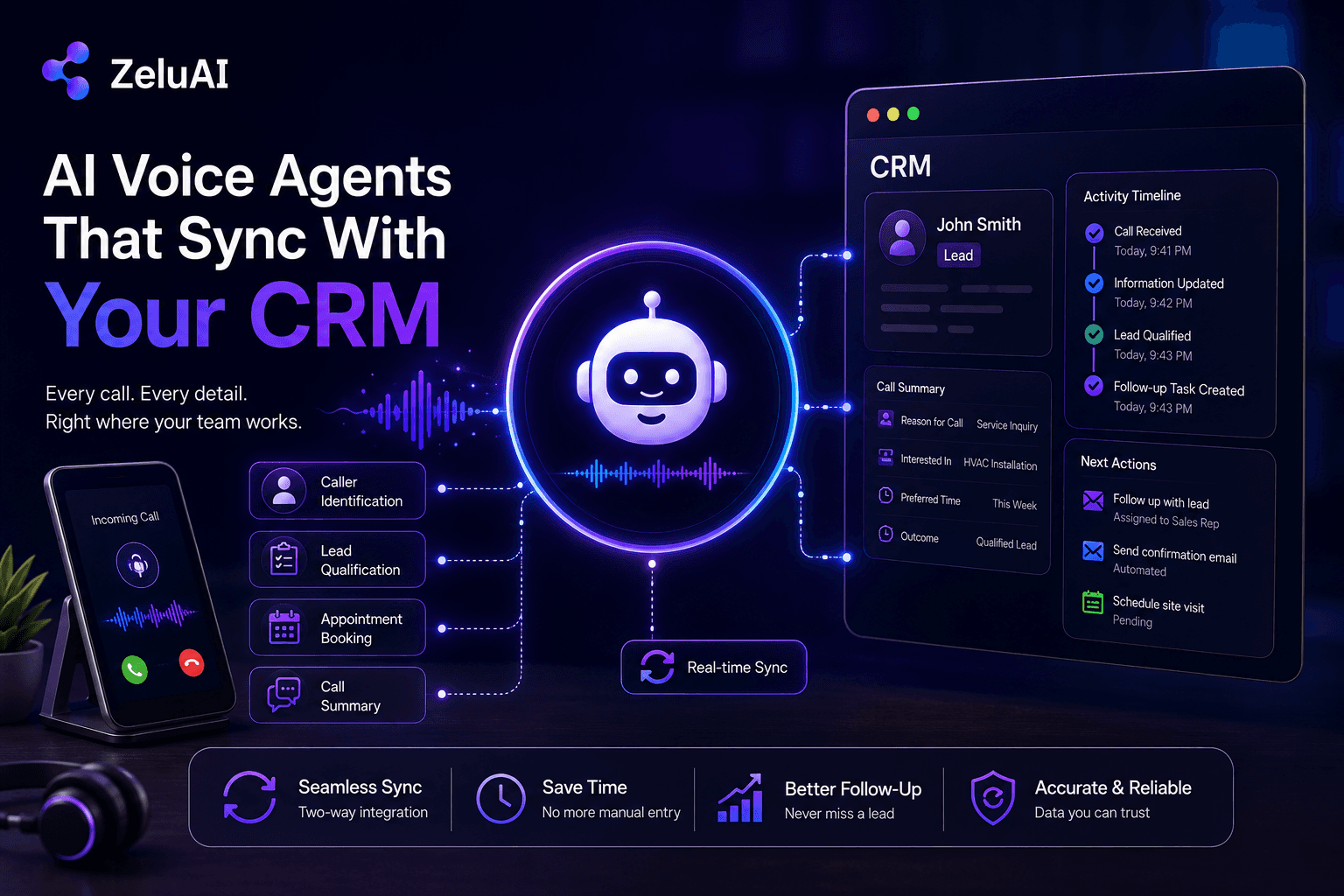
A voice agent that answers every call, books appointments flawlessly, and qualifies every lead perfectly is only doing half its job if none of that information ever reaches the system a sales or support team actually works from every day. The conversation can go perfectly and still lead nowhere.
At ZeluAI, we've mentioned CRM syncing as the real differentiator across our voice agent work, and this is the piece that finally explains what that actually means, mechanically, not just as a feature bullet point.
What Does It Actually Mean for a Voice Agent to Sync With a CRM?
True integration means a voice agent doesn't just route or log a call, it actively reads from and writes to a business's CRM in the process. It identifies who's calling by checking existing records, pulls their history into the conversation, and updates that record with what happened, all without anyone touching a keyboard afterward.
This is different from a system that simply produces a recording or a transcript somewhere. A transcript sitting in a folder isn't integration. A record that updates itself, triggers a follow-up, and shows up instantly in the tool a team already uses, that's the actual distinction.
What Happens to a Call When There's No CRM Integration at All?
Picture a call coming in after hours. The voice agent handles it well, qualifies the caller, notes their timeline, and confirms interest, the same intake work we cover in what an AI receptionist actually handles. The call ends cleanly. By the next morning, nobody on the sales team knows this conversation ever happened unless someone manually digs through call logs and enters the details by hand.
This is the real consequence of a voice agent working in isolation. Every capability it has, answering, qualifying, booking, becomes dependent on a person remembering to check somewhere else for what it just learned. The conversation itself was never the hard part. Getting what it learned into the system that drives follow-up is.
How Does the Technical Connection Actually Work?
Underneath the conversation, the voice agent connects to a CRM through an API, a defined way for two systems to exchange information. A read request pulls existing customer details into the conversation before it even starts, so the agent already knows who it's talking to. A write request pushes new information back, updating a lead's status, logging a call outcome, or creating a new contact entirely.
What Is a Webhook, and Why Does It Matter Here?
A webhook is a notification one system sends to another the instant something changes, rather than either system having to constantly check for updates. When a lead's status changes inside a CRM, a webhook can immediately notify the voice agent to follow up with a call, closing the loop in the other direction, from CRM back to conversation.
What Actually Gets Captured and Synced During a Call?
Beyond just a recording, a well-integrated system captures structured information: the caller's name and details, the specific reason for the call, key facts mentioned, and a summary of the outcome, all organized into fields a CRM can actually use rather than a wall of unstructured text.
What's the Difference Between a Call Log and a Structured Record?
A call log tells you a call happened and roughly how long it lasted. A structured record tells you what was actually said, what the caller needs, and what should happen next, broken into fields a team can search, filter, and act on instantly, rather than having to listen back or read a full transcript to find one detail.
How Does This Trigger Actions Beyond Just Updating a Record?
The more useful part isn't just logging what happened, it's triggering what happens next automatically. A qualified lead can trigger a follow-up task for a sales rep. A booked appointment can sync directly to a calendar, the same mechanism we cover in AI appointment scheduling. A flagged urgent issue can notify the right person immediately, rather than waiting for someone to review the log at the end of the day.
What Should a Business Expect During Setup?
Setup complexity depends heavily on which CRM a business already uses. A native integration, one already built for a common CRM, typically takes a short amount of configuration time. A custom connection into a less common or heavily customized system takes considerably longer, since the mapping between fields has to be built rather than selected from a template, and someone needs to verify each field lands where it's supposed to.
Either way, the goal of setup is the same: making sure the fields a voice agent captures line up with the fields a CRM actually expects, so information lands in the right place automatically instead of needing manual cleanup afterward.
What Still Needs a Human to Review?
This is worth being direct about. A structured record works well for clear, factual information: a name, a callback number, an appointment time. It works less cleanly for nuanced situations, a call that touches multiple unrelated topics, an ambiguous request, or a tone that suggests frustration a transcript alone won't fully capture.
A well-built system flags these cases for review rather than forcing them into a tidy field they don't actually fit. Treating every call as equally straightforward to log is exactly how integrations quietly produce bad data, confident-looking records that don't actually reflect what happened.
How Should a Business Get Started?
The clearest starting point is checking what's actually happening to information right now, when a call ends, where does it go, and who's responsible for acting on it. That gap is usually the first thing worth closing, rather than trying to automate every possible workflow trigger on day one, the same starting-point logic we walk through in AI lead generation for small business.
At ZeluAI, we build AI voice agents designed around this exact connection between conversation and system of record, not just the conversation in isolation. You can see the fuller range of what these systems are built to do on our services page.
Final Thoughts
A voice agent that talks well but doesn't update a business's real systems is solving only the visible half of the problem. The harder, less obvious half is making sure everything learned during a call actually reaches the people and workflows that depend on it, automatically and accurately.
Businesses that start by mapping exactly where information currently gets lost, then closing that specific gap, tend to see far more reliable results than those chasing every possible integration at once. Understanding the mechanics behind the sync is a better starting point than any feature list.
Frequently Asked Questions
Does this work with CRMs that don't have a dedicated voice integration built in?
Yes, a custom API connection can typically be built even without a native integration, though it usually takes more setup time than a pre-built one.
Can a business see the full call transcript, or just a summary?
Most systems retain both, offering a quick summary for fast review with the full transcript available if more detail is needed.
Does the CRM update happen during the call, or only after it ends?
Both happen, some information like caller identification updates in real time, while the full call summary and outcome typically finalize once the conversation ends.
Can integration work with more than one CRM at the same time?
Yes, though it requires careful setup to make sure the same information doesn't create conflicting or duplicate records across systems.
What happens to a call's data if the CRM connection temporarily goes down?
A well-built system queues the update and retries once the connection is restored, rather than losing the information entirely.